



If your tracks on the map page are disappearing or are staying very short, you may need to adjust your track time length, the following steps tells how....


 Note: "Hide" will hide all tracks all the time. "OFF" will show the track in its entirety until the hunt is over.
- Start on main menu
- Select "Setup"
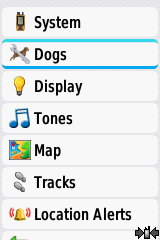
- Select "Dogs"
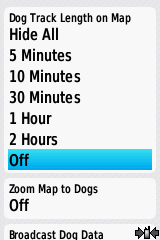
- Select "Dog Track Length on Map"
- You can now select from Hide all tracks, 5 min, 10 min, 30 min, 1 hour, 2 hour, or off.
Note: "Hide" will hide all tracks all the time. "OFF" will show the track in its entirety until the hunt is over.
